What is virtualization?
Virtualization uses software to create virtual computing environments on physical hardware. A virtual machine can receive virtual CPU, memory, storage and networking while remaining separated from other virtual machines.
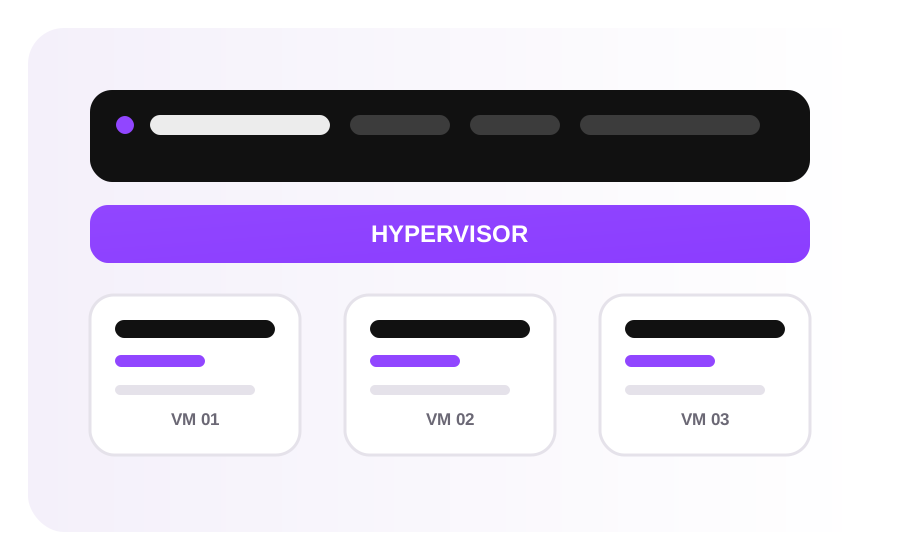
Host, guest and hypervisor
- Host: the physical machine providing resources.
- Guest: the operating system running inside a VM.
- Hypervisor: the software layer managing virtual machines and hardware access.
Type 1 vs Type 2 hypervisors
| Type | Runs on | Typical use |
|---|---|---|
| Type 1 | Physical hardware | Servers and datacenters |
| Type 2 | Host operating system | Desktop labs and development |
What is KVM?
KVM, Kernel-based Virtual Machine, is Linux virtualization technology that uses hardware-assisted virtualization to run virtual machines. It is commonly used as part of Linux server virtualization stacks.
Benefits
Consolidation
Multiple workloads can share physical infrastructure.
Isolation
Workloads can run in separate VM environments.
Testing
VMs provide repeatable operating-system environments.
Mobility
Compatible VM storage and configuration can support migration.
VMs vs containers
VMs generally virtualize hardware and run their own guest kernel. Containers isolate processes while sharing a host kernel. Both can be useful, and container platforms can themselves run inside VMs.
Virtualization and cloud
Virtualization is a technology used by many cloud platforms, but cloud computing adds orchestration, APIs, networking, storage services, identity, automation and operational processes.
Virtualization stack in more detail
A production virtualization stack can be understood as layers: physical compute and storage at the bottom, a hypervisor controlling hardware access, virtual hardware assigned to each VM, a guest operating system, and finally the applications running inside that guest.
Compute allocation
Virtual CPUs represent schedulable CPU capacity exposed to a guest. Planning should consider both the number of virtual CPUs and the actual workload pattern.
Memory
Each guest needs enough RAM for its operating system, services and application working set. Memory pressure can affect multiple workloads on a host.
Virtual disks
VM disks are backed by underlying storage. Capacity, latency, throughput and backup design all affect the guest experience.
Virtual networking
Virtual network interfaces connect guests to software switches, routed networks and the physical network layer.
VM lifecycle and operational planning
- Provision: choose the guest OS, CPU, RAM, storage and network configuration.
- Configure: patch the OS, create accounts, set access controls and install the required software.
- Operate: monitor resource use, logs, availability and security events.
- Protect: maintain backups and test recovery procedures appropriate to the workload.
- Retire: remove obsolete VMs and securely handle data that is no longer required.
Virtualization architecture in depth
Virtualization abstracts physical compute resources into virtual machines or other isolated workloads. A host supplies physical CPU, memory, storage and networking. The hypervisor or virtualization stack presents virtual hardware to guests, while the guest operating system manages applications in its own environment.
CPU, memory and storage virtualization
CPU virtualization maps virtual processor resources to physical execution resources. Memory virtualization provides each guest with a virtual address space while the host controls the underlying memory. Storage virtualization presents virtual disks backed by physical or distributed storage. The result is flexibility, but actual performance still depends on the underlying hardware, scheduling and storage path.
CPU scheduling
Virtual CPUs compete for physical execution capacity. Overcommitting resources can increase contention when many workloads become busy at the same time.
Memory allocation
RAM allocation affects application stability and cache behavior. Memory pressure can lead to swapping or other performance degradation depending on the operating system and configuration.
Virtual disks
Virtual disks abstract storage devices. I/O latency and throughput depend on the storage backend, filesystem, queueing and workload pattern.
Virtual networking
Virtual switches, interfaces and network policies connect guests to one another and to external networks while preserving logical separation.
Hypervisor choices: Type 1 and Type 2
A Type 1 hypervisor runs directly on physical hardware and is common in server environments. A Type 2 hypervisor runs above a conventional host operating system and is frequently used on desktops and development machines. KVM is a Linux kernel-based virtualization technology commonly used as part of server virtualization stacks.
Virtual machines versus containers
Virtual machines normally provide a full guest operating system boundary, while containers share the host kernel and isolate processes at the operating-system level. VMs can be useful when workloads need different operating systems or stronger VM-level separation; containers are often efficient for application packaging and rapid deployment. They solve related but different problems and can be used together.
Virtualization and cloud computing
Virtualization is one technology used to deliver cloud infrastructure, but cloud computing is broader. Cloud platforms add resource orchestration, APIs, provisioning, networking, storage services, identity controls, automation and operational tooling around underlying compute resources.
VM lifecycle
- Provision the VM with the required CPU, memory, storage and network configuration.
- Install or clone the operating system and apply baseline security updates.
- Configure applications, users, services and monitoring.
- Capture backups or images according to the recovery plan.
- Scale or resize resources based on measured workload requirements.
- Retire the VM deliberately by preserving required data and removing unnecessary credentials and network rules.
Virtualization troubleshooting
Start by separating guest problems from host or platform problems. Check guest CPU and memory pressure, disk latency, filesystem capacity and network configuration first. If several unrelated guests show symptoms simultaneously, investigate host resource contention, storage health, network congestion or virtualization-platform events.
Virtualization capacity and contention
Virtualization allows physical resources to be shared across multiple guests, but sharing introduces scheduling and contention considerations. A host can have enough total resources while still experiencing contention during synchronized workload peaks. Monitoring should therefore consider both individual guest metrics and host-level behavior when diagnosing performance.
Practical questions
- Are multiple guests becoming busy at the same time?
- Is storage latency increasing for several unrelated VMs?
- Is memory pressure occurring inside the guest, on the host, or both?
- Are network symptoms isolated to one VM or visible across the host?
- Did the symptoms begin after a migration, resize or platform change?